Julia vs Python - Which Should You Learn?

August 14, 2023

Julia vs Python - Which Should You Learn?


We present the distinctions between Python and Julia to help you simplify the decision-making process so you can get started on advancing or enhancing your career.

The fields of data science & machine learning have made it possible for machines to learn from experience and derive astounding insights into how things and people function. However, realizing the potential of these technologies requires a moderate level of technical capability. Many tools have been developed to simplify procedures when working on data science and machine learning projects. For example, look at the top programming languages for Data Scientists in 2022.

Initially, conversations regarding what programming language beginners should learn for data science & machine learning were dominated by Python vs. R (you can learn more about the difference between Python and R for Data Science in a separate post). Now, things are starting to change; There is no doubt Python has been one of the most popular programming languages of


recent times. According to the TIOBE Index for November 2022, Python has topped the popularity charts, but there is a new tool on the block called Julia.  

As Julia continues to gather momentum, several experienced data science and machine learning practitioners may ponder whether it is worth upskilling, while beginners are asking themselves new questions such as, “should I learn Python or Julia?” In this article, we will present the distinctions between Python and Julia to help simplify the decision-making process so you can get started on advancing or enhancing your career. 

What is Python? 

Most people in the technology space would have heard of Python – it has been popular among developers for many years, especially since the rise of data science and machine learning. The language was conceived by Guido van Rossum and was first released in 1991 as a successor to the ABC programming language

Python is a high-level, interpreted, object-oriented programming language with dynamic semantics – which means that its variables are dynamic objects. The Python interpreter and the extensive standard libraries that come with the programming language are freely distributed and available in source or binary form. 

“Its high-level built-in data structures, combined with dynamic typing and dynamic binding, make it very attractive for Rapid Application Development, as well as for use as a scripting or glue language to connect existing components.” 

[Source: Python Documentation]

Who uses Python?

Python is a general-purpose language. Thus, you can use it for building software in a broad range of application domains across many hardware configurations and operating systems. 

Example domains include: 

Check out our article on What Python is Used For? 7 Real-Life Python Uses to go more in-depth with Python use cases. 

Advantages of Python

Several factors contribute to why Python is extremely popular. Here are a few: 

  • Accessibility: Python's syntax almost mimics that of natural language, which makes it easier to read and comprehend for other developers. Consequently, developers can build projects and improve on them faster since the language is extremely simple. 
  • Versatility: Python is a general-purpose language, which means it can do and create several different things, from machine learning to scripting and automation of everyday tasks.
  • Want to Earn daily 500 to 800 USD

     by selling High demand &

     Ultra modern and novel Gadgets online ?

    START HERE 

  • Open-Source: Python is developed under an OSI-approved open-source license. Thus, it is free to use and distribute for all purposes, including commercial use. The combination of Python being freely distributed and its growing popularity has contributed to a strong community developing around the language, which users can tap into whenever support is required.
  • Libraries: Libraries are extremely useful tools that can make developers more efficient in their jobs. At the time of writing, there are more than 137 000 Python libraries that can be used to create applications in a variety of fields. 

Disadvantages of Python

Despite all of the advantages of Python, it has its fair share of naysayers for the following reasons: 

  • Speed: One of the main critiques of Python is its speed. Being a dynamically typed interpreted language, Python is slow compared to compiled languages such as C and Java (which can also be considered to be interpreted as it is a hybrid language). 
  • Memory consumption: Python is flexible to data types, which results in a large amount of memory being consumed. 
  • Mobile environment: Despite thriving in the development of server and desktop applications, Python is not ideal for mobile development due to its high memory consumption and slow processing speed compared to other programming languages. 
  • Runtime errors: Python is a dynamically typed language, which means data types are associated with values instead of variables. Many Python users have complained about this design as it raises various issues. For example, the value assigned to a variable can be changed at any time in a program, which means the variable's data type could change, thereby leading to errors at runtime. 

What is Julia?

At the beginning of 2022, in the year of their tenth anniversary, Julia computing announced the programming language had been downloaded nearly 35 million times, which is nearly five times the total cumulative number of downloads as of three years prior. It is this type of growth that has brought Julia to the attention of several developers.

Note: Develop your Julia programming skills with the Introduction to Julia course. 

The founders of Julia –  Jeff Bezanson, Alan Edelman, Stefan Karpinski, Viral B. Shah – had one clear purpose: to improve the shortcomings of other programming languages while simultaneously incorporating their distinctive and desirable qualities. In a blog post titled Why we Created Julia, the authors brazenly state, “We are greedy: we want more” before listing several desirable yet ambitious qualities they would like to be present in Julia.

“We want a language that's open source, with a liberal license. We want the speed of C with the dynamism of Ruby. We want a language that's homoiconic, with true macros like Lisp, but with obvious, familiar mathematical notation like Matlab. We want something as usable for general programming as Python, as easy for statistics as R, as natural for string processing as Perl, as powerful for linear algebra as Matlab, as good at gluing programs together as the shell. Something that is dirt simple to learn, yet keeps the most serious hackers happy. We want it interactive and we want it compiled. (Did we mention it should be as fast as C?).”

[Source: Why we Created Julia]

By the time they released Julia 1.0.0 in 2018, 90% of the promises they had made six years prior had been delivered. 

But what exactly is Julia? 

The best way to think of it is as a high-level, dynamic, fast, and easy-to-use programming language containing features well suited for numerical analysis and computational science. You can learn more about The Rise of Julia in a separate article. 

Who uses Julia?

One of Julia's primary goals was to develop a language that would allow developers to write code that is concise, high-level, generic, and abstract, similar to mathematical formulas, while also being able to generate the low-level machine code common to static languages quickly. 

Despite being designed specifically with technical and scientific users in mind, Julia is also considered to be a general-purpose language, which means it is broadly applicable across application domains and lacks specialized features. 

These features have made Julia extremely attractive to developers in fields that involve: 

  • Numerical Computing 
  • Machine Learning
  • Statistics
  • Web Development

Check out our article What is Julia Used For? 10 Applications of Julia Programming to go more in-depth with Julia's use cases. 

Advantages of Julia

  • Speed: One of the main appeals of Julia is undoubtedly its speed. Julia is fast. It uses just-in-time (JIT) compilation, which means there is less chance of code being interpreted multiple times, so there is less overhead. Also, Julia consistently outperforms existing data programming languages such as Python, R, and Matlab in benchmarking tests, which comes down to the fact that Julia is a compiled programming language instead of an interpreted one. 
  • Accessibility: Julia has a clear syntax – cleaner than C++ – that is simple to use and easy to learn. It is dynamically typed, which is generally more succinct than statically typed languages.
  • Purposeful: Much of the day-to-day work of the creators of Julia included scientific computing, machine learning, data mining, large-scale linear algebra, and distributed & parallel computing. Thus, Julia was designed with scientific computing in mind and contains a robust selection of packages that enable additional use cases in the fields of science, mathematics, statistics, and machine learning. 

Disadvantages of Julia

Despite the blossoming introduction Julia has received thus far, the language is far from perfect and presently contains some significant limitations. 

  • Age: Julia is a new language. Therefore, the language is not as popular or supported as other languages like Python and R.
  • The time to first plot problem: There are still some issues with Julia’s JIT compiler, which results in a noticeable lag when attempting to run code from some packages, for the first time. The authors state, “Because of the way Julia works under the hood, this is a difficult problem to solve, but much progress has been made in the past few years to reduce this compilation time.” [Source: Julia Documentation].  
  • Small ecosystem: As expected from a new technology, Julia’s community and ecosystem are still in their early stages. Although Julia has plenty of unique solutions and packages, they are dwarfed when compared to the likes of Python and R’s ecosystem – both of which have an ecosystem that has been evolving for the past 20+ years. 

Python vs. Julia: Key Differences

Python boasts an established, large community that contributes to the language and supports other Python developers. The language is also extremely versatile and has several use cases, thereby living up to the name of a general-purpose programming language. On the contrary, despite also being considered a general-purpose programming language, Julia is considerably less versatile than Python – however, it is a great tool for scientific programming. 

One of the main factors that make Julia so appealing is how fast it is; Julia trumps Python in speed and performance. This is because Julia is a compiled language written on its base, whereas Python is an interpreted language meaning each line must be reprocessed, resulting in slower execution.   

Want to Earn daily 500 to 800 USD

 by selling High demand &

 Ultra modern and novel Gadgets online ?

START HERE 

Features 

Python

Julia

Release Year

1991

2012

Type 

Interpreted 

Compiled

Libraries

137000+

7400+

TIOBE Index rank (Dec 2022)

1st

24th

Community

Python has a large, well-developed community

Julia’s community is newer and much smaller than Python

Array indexing

0-indexed

1-indexed

Speed

Slower in some areas

Faster in some areas

Difficulty

Easy

Easy to Medium

Julia vs Python - Which to Choose? 

It is too early to explicitly state that Julia will dethrone Python in certain domains, such as data science and machine learning. Though both languages boast easy-to-read and easy-to-learn syntaxes, they each have their respective advantages. For instance, Python has a large established community and a vast array of frameworks and libraries, as well as being extremely versatile. Julia, on the other hand, is an excellent tool for scientific computing that is growing in popularity due to its speed. 

For seasoned professionals, learning a new program language may be a worthwhile investment if the benefits of the language are significant since acquiring the skill takes time, which may hamper productivity. Beginners starting their journey should pay attention to job boards to see what skills are in demand and equip themselves accordingly. 

Another way to determine which language to choose is by considering the type of programs you intend on building. For programs that are not extremely large, Python may be able to generate results faster than Julia since it is interpreted instead of compiled. However, if you plan on building programs with CPU-heavy computations should probably lean more toward Julia.  

 Learn more...

https://itexamtools.com/master-of-applied-data-science/

https://itexamtools.com/what-is-the-difference-between-python-and-ruby/

https://itexamtools.com/7-skills-employers-of-the-future-will-be-looking-for/

https://itexamtools.com/aws-masterclass-go-serverless-with-aws-lambda-aws-aurora/

https://itexamtools.com/azure-fundamentals-how-to-pass-the-az-900-exam/

https://itexamtools.com/what-is-a-business-intelligence-dashboard/

 https://itexamtools.com/affiliate-bots-v2-07/

https://itexamtools.com/online-social-media-jobs-product-review/

https://itexamtools.com/recession-free-profits-product-review/

 https://itexamtools.com/niche-marketing-kit-product-review/

 https://itexamtools.com/click-wealth-system-product-review/

 https://itexamtools.com/livpure-product-review/

 https://itexamtools.com/ikaria-lean-belly-juice-product-review/

============================================

Want to Earn daily 500 to 800 USD

 by selling High demand &

 Ultra modern and novel Gadgets online ?

START HERE 


Designing and Deploying Cisco Unified IM and Presence

August 13, 2023

Designing and Deploying Cisco Unified IM and Presence


Implementing Cisco Collaboration Applications (CAPPS) Foundation Learning Guide (CCNP Collaboration Exam 300-085 CAPPS)

Let's learn some chapters from this book

Upon completing this chapter, you will be able to do the following:

  • Describe native presence in Cisco Unified Communications Manager without Cisco Unified Communications IM and Presence (IM&P) servers
  • Describe how the subscribe CSS controls presence watchers
  • Describe how presence groups add more granularity to the presence functionality
  • Describe the requirements when using Cisco Jabber for presence functionality
  • Describe how to integrate a Cisco presence solution within a Microsoft environment in an enterprise
  • Describe the characteristics of the Cisco Unified Communications IM&P OVA templates and the required physical resources
  • Describe the Cisco Unified Communications IM&P cluster architecture
  • Describe how to deploy Cisco Unified Communications IM&P in different scenarios
  • Describe how Cisco Jabber discovers services to register
  • Describe the Cisco Jabber quality of service issues with trust boundaries
  • Describe the different ports that Cisco Jabber uses to communicate
  • Describe how to connect Cisco Unified Communications IM&P clusters within the same domain
  • Describe how to connect Cisco Unified Communications IM&P clusters that are in different domains
  • Describe SIP federations with Microsoft domains
  • Describe the state mappings between Cisco Unified Communications IM&P and Microsoft Skype for Business
  • Describe the preparation that is necessary to implement a federated presence network


This chapter describes the Cisco Unified Communications IM and Presence (IM&P) architecture and design. 

Native presence in Cisco Unified Communications Manager (CUCM) is presented and the different Cisco Unified Communications IM&P approaches are described. 

Cisco Unified Communications IM&P can be configured to peer with another Cisco Unified Communications IM&P cluster in the same domain or can be federated with Cisco Unified Communications IM&P clusters in a different domain.

CUCM Presence Introduction

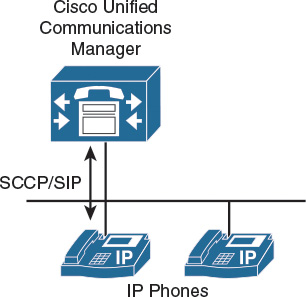
This section describes native presence in CUCM without Cisco Unified Communications IM&P servers, as shown in Figure 14-1.

Figure 14-1

Figure 14-1 CUCM Presence

CUCM offers very limited native presence functionality on IP phones. Although a Cisco Unified Communications IM&P server is not required in this simple example, only these native presence features of the CUCM are available:

  • CUCM speed-dial presence: CUCM administratively supports the ability for a speed dial to have presence capabilities via a BLF speed dial. BLF speed dials work as both a speed dial and a presence indicator.
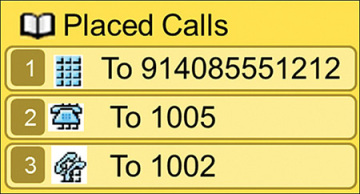
  • CUCM call history presence: CUCM administratively supports presence capabilities for call lists and directories on the phone.
  • CUCM presence policy: CUCM provides the capability to set policy for users who request presence status.

CUCM Presence

This section describes the integration of external presence entities into the native presence solution.

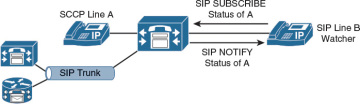
All presence requests for users, whether inside or outside a cluster, are processed by CUCM, as shown in Figure 14-2.

Figure 14-2

Figure 14-2 CUCM Native Presence

A CUCM watcher that sends a presence request will receive a direct response, including the presence status, if the watcher and presence entity are both located within the cluster.

If the presence entity exists outside the cluster, CUCM will query the external presence entity through the Session Initiation Protocol (SIP) trunk. 

For A watcher that is not in a CUCM cluster, the CUCM can send a presence request off cluster entity by way of a SIP trunk. If the off-cluster entity supports presence, it will respond with the current presence status. 

If the off-cluster entity does not support presence, it will reject the presence request with a SIP error response.

Skinny Client Control Protocol (SCCP) endpoints can request the presence status of the indicated presence entity by sending SCCP messages to CUCM. 

If the presence entity resides within the CUCM cluster, CUCM responds to the SCCP line-side presence request by sending SCCP messages to the presence watcher that indicate the status of the presence entity.

CUCM uses the term SIP line to represent endpoints supporting SIP that are directly connected and registered to CUCM, 

and the term SIP trunk to represent trunks supporting SIP. SIP line-side endpoints acting as presence watchers can send a SIP SUBSCRIBE message to CUCM requesting the presence status of the indicated presence entity.

Want to Earn daily 500 to 800 USD

 by selling High demand &

 Ultra modern and novel Gadgets online ?
START HERE 

If the presence entity resides outside the CUCM cluster, CUCM routes a SUBSCRIBE request out on the appropriate SIP trunk, 

based on the SUBSCRIBE CSS and presence groups. When CUCM receives a SIP NOTIFY response on the trunk that indicates the presence entity status, 

it responds to the SCCP line-side presence request by sending SCCP messages to the presence watcher indicating the status of the presence entity.

------------------------------------------------------------------------------

Indicators for Speed-Dial Presence

Table 14-1 describes the native presence indicators on IP phones.

Table 14-1 Cisco Unified Communications Speed-Dial Presence

State

Icon

LED

Idle

phone.jpg

ideal.jpg

Busy

busyphone.jpg

busy.jpg

Unknown

unknow.jpg

unknowled.jpg

CUCM supports the ability for a speed dial to have presence capabilities via a Busy Lamp Field (BLF) speed dial. 

BLF speed dials work as both a speed dial and a presence indicator. Only the system administrator can configure a BLF speed dial. 

A system user is not allowed to configure or modify a BLF speed dial.

The administrator must configure the BLF speed dial with a target directory number that is resolvable to a directory number within the CUCM cluster or an entity accessed by a route pattern at accessed by a SIP trunk destination. 

The BLF speed-dial indicator is a line-level indicator and not a device-level indicator.

The BLF speed-dial indicators show the real-time state of the monitored phone:

  • Idle: The user phone is on hook and the user is available.
  • Busy: The user phone is off hook and the user is not available.
  • Unknown: The real-time state cannot be determined. The phone might be disconnected, the users are not in the same presence group, or the users are not allowed to see the presence status.
-----------------------------------------------------------------------------------


CUCM Call Presence

Call list presence capabilities are controlled via the BLF for the Call Lists enterprise parameter within CUCM Administration.

 The BLF for the Call Lists enterprise parameter impacts all pages that use the phone Directories button and it is set on a global basis, as shown in Figure 14-3.

Figure 14-3

Figure 14-3 CUCM Presence Call History on an IP Phone

-----------------------------------------------------------------------------------------------------------------------------------------

CUCM Subscribe CSS

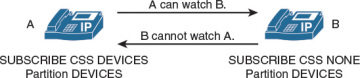
Figure 14-4 describes how the subscribe CSS controls presence watchers.

Figure 14-4

Figure 14-4 CUCM Subscribe CSS

CUCM provides the capability to set policy for users who request presence status:

  • Configure a CSS to route SIP SUBSCRIBE messages for presence status.
  • Configure presence groups with which watchers can be associated, that specify rules for viewing the presence status of presence entities that are associated with another group.

The first aspect of presence policies for CUCM is the subscribe CSS. 

CUCM uses the subscribe CSS to determine how to route presence requests. 

Presence requests are SUBSCRIBE messages with the Event field set to Presence. 

These messages are sent from the watcher, which can be a phone or a trunk. 

The subscribe CSS is associated with the watcher and lists the partitions that the watcher is allowed to see.

 This mechanism provides an additional level of granularity for the presence SUBSCRIBE requests to be routed independently from the normal call-processing CSS.

With the subscribe CSS set to <None>, BLF speed dial and call list presence status does not work (if no directory number or route pattern is associated with the <None> partition) and the subscription message is rejected as “user unknown.” 

When a valid subscribe CSS is specified, the indicators work and the SUBSCRIBE messages are accepted and routed properly.

-----------------------------------------------------------------------------------------------------------------------------------------

CUCM Presence Groups

Figure 14-5 illustrates how presence groups add more granularity to the presence functionality.

Figure 14-5

Figure 14-5 CUCM Presence Groups

Devices, directory numbers, and users can be assigned to a presence group, and by default, all users are assigned to the same standard presence group. 

By default, if the subscribe calling search space (CSS) permits, all watchers can watch all other entities.

A presence group controls the destinations that a watcher can monitor, based on the association of a user with a defined presence group; 

for example, employees watching managers is disallowed, but managers watching employees is allowed.

When multiple presence groups are defined, as shown in the picture, the Inter-Presence Group Subscribe Policy service parameter is applied. 

If one group has a relationship to another group via the Use System Default setting, rather than being allowed or disallowed, the value of this service parameter will take effect. 

If the Inter-Presence Group Subscribe Policy service parameter is set to Disallowed, CUCM will block the request even if the subscribe CSS allows it.


Observe the following guidelines when configuring presence within CUCM:

  • Define a presence policy for presence users.
  • Use subscribe CSSs to control the routing of a watcher presence-based SIP SUBSCRIBE message to the correct destinations.
  • Use presence groups to define sets of similar users and to define whether presence status updates of other user groups are allowed or disallowed.
  • Call list presence capabilities are enabled on a global basis. The user status can be secured by using a presence policy.
  • BLF speed dials are administratively controlled and are not impacted by the presence policy configuration.


Cisco Unified Communications IM&P Introduction

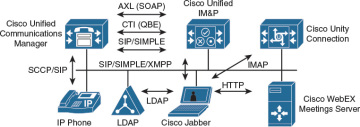
Figure 14-6 illustrates the components when using Cisco Jabber for presence functionality.

Figure 14-6

Figure 14-6 CUCM IM&P

Integrating Cisco WebEx Meetings Server, 

Cisco Unity Connection, and other applications into the presence network offers a feature-rich communications environment with the Cisco Jabber client application as the single interface for voice and video calls, 

voice-mail playback, web conferencing, and integrated directories.

The following are available features in this deployment:

  • Real-time availability: This feature provides real-time availability of other Cisco Jabber users.
  • Contact list: This feature allows users to search the corporate directory from one easy-to-use interface to locate contacts quickly. Simply click to call.
  • Media escalation: This feature provides the ability to add communication methods during a session; for example, add video to an existing audio session, or add web conferencing to an existing audio or video session.
  • Click-to-call: This feature provides the ability to dial from the contact list by using the integrated softphone or an associated IP phone.
  • Integrated voice and video calling: This feature provides the ability to exchange ideas face to face with a coordinated video display on the PC screen and audio conversation with the softphone. Users can place video calls to other users.
  • IP phone association: This feature allows users to use Cisco Jabber to control an IP phone and make or receive calls.
  • Conferencing: This feature allows users to create multiparty voice or video conferencing sessions by simply merging conversation sessions by using the Cisco Jabber intuitive interface.

Want to Earn daily 500 to 800 USD

 by selling High demand &

 Ultra modern and novel Gadgets online ?
START HERE 

  • Web conferencing: This feature allows users to launch a web conferencing session immediately to share content, such as a presentation, with others.
  • Voice messages: This feature allows users to access Cisco Unity Connection voice-mail messages—view, play back, sort, and delete messages—all from the same client application.
---------------------------------------------------------------------------------------------------------------------------------------------------

Microsoft Integration

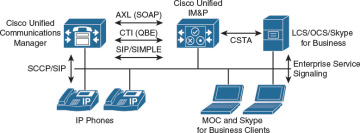
Figure 14-7 illustrates how to integrate a Cisco presence solution within a Microsoft environment in an enterprise.

Figure 14-7

Figure 14-7 Cisco to Microsoft Integration

Cisco Unified Communications IM&P implements a Computer-Supported Telephony Application to Computer Telephony Integration (CSTA-to-CTI) bridge to integrate with Microsoft Office Communications Server (OCS) and Skype for Business interfaces. 

Cisco Unified Communications IM&P includes the following CTI gateway functionalities:

  • CSTA over SIP interface to Microsoft Skype for Business and OCS server is available.
  • A CTI interface to CUCM is available.
  • A linkage of the older Microsoft Office Communicator (MOC) and the current Microsoft Skype for Business client and CUCM endpoints for a specific user is realized, which supports monitoring of CUCM endpoint activity via Microsoft clients. Support for call establishment and call modification for CUCM endpoints via Microsoft clients is also included.
  • The functionality provides click to dial, phone hook status reporting, and general phone control directly from the Microsoft client.


-----------------------------------------------------------------------------------------------------------------------------------------------------

OVA Template for Cisco Unified Communications IM&P

Table 14-2 presents the available VM overlays for Cisco Unified Communications IM&P installations.

Table 14-2 OVA Template for Cisco Unified Communications IM&P

User Capacity

vCPUs

Memory (GB)

vDisk

vNIC

500

1

2

1 x 80 GB

1

1000

1

2

1 x 80 GB

1

2000

1

4

1 x 80 GB

1

5000

2

4

2 x 80 GB

1

15,000

4

8

2 x 80 GB

1

The 500-user OVA template is the minimum VM configuration for use with the Cisco Hosted Collaboration Solution. 

The 1000-user OVA template is only supported for Cisco Business Edition 6000.

Another important factor is the number of presence or IM users. When using only IM, without presence, higher user counts are supported per server and cluster:

  • 500 full UC users, 1000 IM-only users, 6 single nodes, or subclusters
  • 1000 full UC users, 2000 IM-only users
  • 2000 full UC users per node, 2000 IM-only users, 3 single nodes, or subclusters
  • 5000 full UC users, 12,500 IM-only users, 6 single nodes, or subclusters
  • 15,000 full UC users, 25,000 IM-only users, 6 single nodes, or subclusters

IM&P Service maximum capacities per cluster are as follows:

  • Cisco Unified Communications mode: In this mode, IM&P service integrates into a full Cisco Collaboration Systems environment to provide an enterprise-class IM&P solution in conjunction with the full suite of Cisco Collaboration Systems services, 
  • including voice and video. In this mode, IM&P service supports Cisco Collaboration Systems clients, such as the Cisco Jabber platform, 
  • and Cisco Jabber SDK, as well as third-party Extensible Messaging and Presence Protocol (XMPP) standard-based clients. 
  • When operating in Cisco Unified Communications mode, IM&P Service scales up to a maximum of 45,000 users in a multinode CUCM cluster environment.
  • IM-only user mode: IM&P Service provides an enterprise-class IM&P solution for enterprise users who are not using CUCM for call control. 
  • In IM-only user mode, IM&P Service supports Cisco Collaboration Systems clients such as the Cisco Jabber client, and Cisco Jabber SDK for all enterprise-class IM&P services. 
  • IM&P Service also supports the ability for third-party XMPP standard-based clients to interface with CUCM for IM&P services. 
  • When operating in Cisco IM-only user mode, IM&P Service scales up to a maximum of 75,000 users in a multinode cluster environment. 
  • Users deployed as part of the Jabber for Everyone offer without voice and video services operate in IM-only user mode.
  • Microsoft Skype for Business interoperability mode (or Microsoft Remote Call Control): In this mode, IM&P Service allows Microsoft Skype for Business users on a PC to interoperate with Cisco Unified IP phones on CUCM by providing click-to-dial and associated phone monitoring capabilities.

  •  Interoperability is made available by activating Microsoft Skype for Business interoperability mode in IM&P Service and configuring Microsoft Skype for Business users. When operating in this mode, 
  • IM&P Service scales up to 40,000 Microsoft Office Communicator users per CUCM cluster.
-----------------------------------------------------------------------------------

Cisco Unified Communications IM&P Cluster

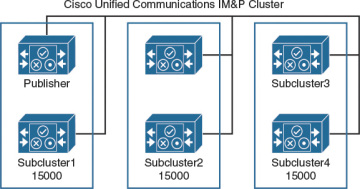
Figure 14-8 illustrates the Cisco Unified Communications IM&P cluster architecture maximum option of up to six servers per cluster.

Figure 14-8

Figure 14-8 Cisco Unified IM&P Cluster

A cluster can be formed to scale Cisco Unified Communications IM&P to support up to 45,000 licensed presence users. 

The Cisco Unified Communications IM&P server uses the same virtualization approach that is used by CUCM or Cisco Unity Connection.

Cisco Unified Communications IM&P consists of up to six servers, including one server that is designated as a publisher.

 Cisco Unified Communications IM&P utilizes the same architectural concepts as the CUCM publisher and subscriber.

 Within a Cisco Unified Communications IM&P cluster, individual servers can be grouped to form a subcluster, and the subcluster can have at most two servers that are associated with it.

The figure shows the topology for a Cisco Unified Communications IM&P cluster. 

The Cisco Unified Communications IM&P cluster can also have mixed subclusters, where one subcluster is configured with two servers while other subclusters contain a single server. 

The Cisco Unified Communications IM&P servers form their own cluster even if they are integrated as subscribers in the CUCM cluster.

-----------------------------------------------------------------------------------

you learnt all this from the book below.


Get the book here


Learn more...

https://itexamtools.com/master-of-applied-data-science/

https://itexamtools.com/what-is-the-difference-between-python-and-ruby/

https://itexamtools.com/7-skills-employers-of-the-future-will-be-looking-for/

https://itexamtools.com/aws-masterclass-go-serverless-with-aws-lambda-aws-aurora/

https://itexamtools.com/azure-fundamentals-how-to-pass-the-az-900-exam/

https://itexamtools.com/what-is-a-business-intelligence-dashboard/

 https://itexamtools.com/affiliate-bots-v2-07/

https://itexamtools.com/online-social-media-jobs-product-review/

https://itexamtools.com/recession-free-profits-product-review/

 https://itexamtools.com/niche-marketing-kit-product-review/

 https://itexamtools.com/click-wealth-system-product-review/

 https://itexamtools.com/livpure-product-review/

 https://itexamtools.com/ikaria-lean-belly-juice-product-review/


Want to Earn daily 500 to 800 USD

 by selling High demand &

 Ultra modern and novel Gadgets online ?

START HERE 


ads 728x90 B
Powered by Blogger.