
An Introduction to Machine Learning with Julia

An Introduction to Machine Learning with Julia
What is Julia?
Julia is a relatively newer programming language that was first released in 2012. Even though Julia has only been around for ten years, it has been growing rapidly and is now one of the top 30 programming languages according to the October 2022 TIOBE index.
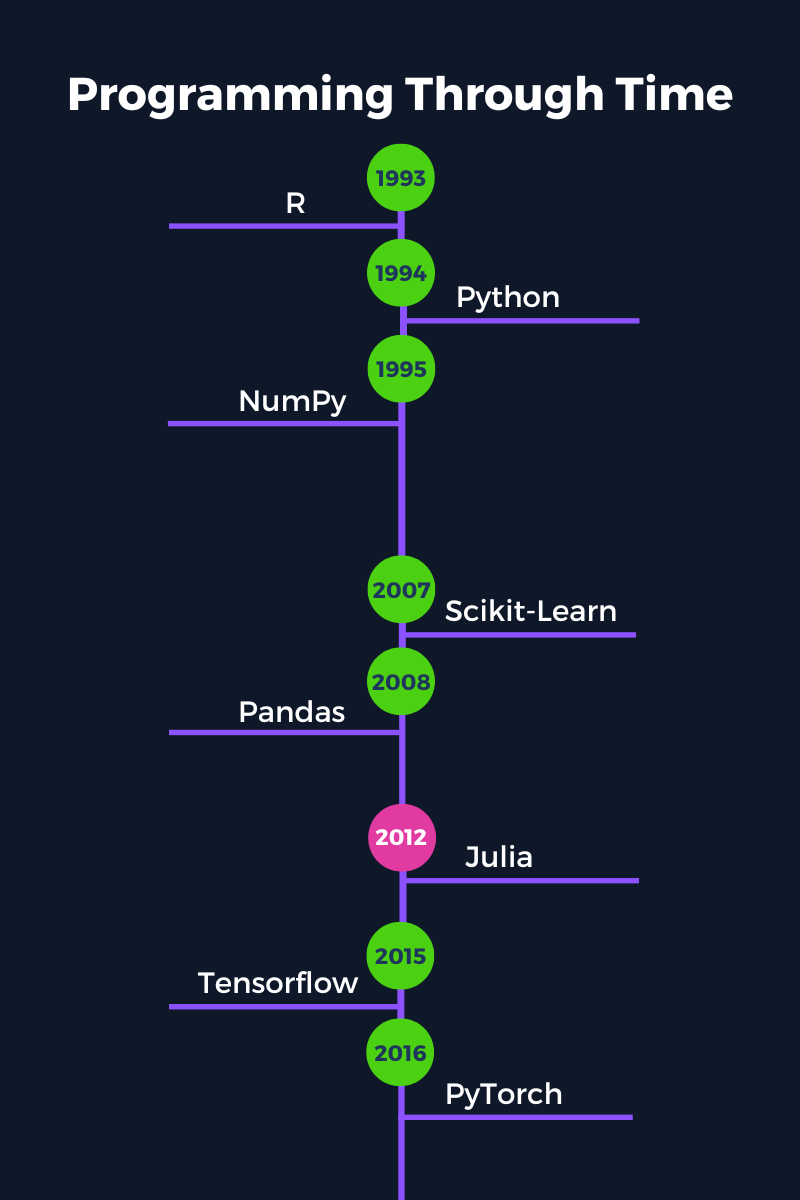
A standout feature of Julia is that it was built for scientific computing. This means that Julia is both easy to use and fast while also capable of handling large amounts of data and complex computations at blazing speeds. A famous Julia tagline is that it "runs like C but reads like Python."
Julia is a compiled language that reads like an interpreted language. Most other traditional compiled languages (such as C or C++) capable of solving computationally intensive problems must first be compiled into a machine-readable format before it can be executed.
On the other hand, Julia can achieve the same performance with the simplicity of an interpreted language (like Python) but without needing to be compiled before executing. Instead, Julia uses a Just-In-Time (JIT) compiler that compiles at run-time.
Want to Earn daily 500 to 800 USD
by selling High demand &
Ultra modern and novel Gadgets online ?
Why Choose Julia for Machine Learning?
Python has dominated the data science and machine learning landscape for a long time, and for good reason. It is an incredibly powerful, flexible programming language. However, there are some downsides to Python that are non-issues in Julia.
Some of the Python downsides compared to Julia are:
- Python is a slower, interpreted language with limited options to improve its speed. This can make big data machine learning projects inefficient compared to Julia.
- Python uses single dispatch, which places a significant limitation on the types that can be used and shared between functions and libraries.
- Parallel computing and threading are not built into the design of the Python language. While there are libraries that allow some threading, it is not optimal.
In this section, we go over several reasons why Julia is a great choice for machine learning.
You can further explore the rise of the language and whether Julia is worth learning in 2022 in a separate blog post.
1. Simplicity & Ease of Use
Julia has a very friendly syntax that is close to English. This makes it much quicker to pick up and learn since the code is often intuitive and easy to understand.
Julia is also quick and easy to install and get started with right away. There is no need to install special distributions of the language (such as with Python and Anaconda) or to follow any convoluted installation process (like with C and C++).
For machine learning practitioners, the sooner you can remove the friction in the programming aspects, the sooner you can start doing what you do best: analyzing data and building models.
2. Speed
One of Julia's greatest hallmarks is its speed. We mentioned above that Julia is a compiled language, providing considerable speed improvements over interpreted languages.
Julia belongs to the "petaflop club" together with C, C++, and Fortran. That's right; this exclusive club has only four members and one requirement for joining: simply reach speeds of one petaflop (i.e., one thousand trillion operations) per second at peak performance.
It’s not uncommon to encounter large amounts of data in machine learning, so using a fast programming language can significantly improve training times and reduce costs when deploying models into production.
3. Devectorized Code is Fast
In Julia, there is no need to vectorize code to increase performance. Writing devectorized code in the form of loops and native functions is already fast. While vectorizing code in Julia may result in a slight speed improvement, it is unnecessary.
Writing and using devectorized code can save you a lot of time when building machine learning models since you will not need to refactor code to improve the speed.
4. Code Re-Use & Multiple Dispatch
Julia uses duck-typing to 'guess' the appropriate type for a function. This feature means: that if it walks like a duck, and talks like a duck, it's probably a duck. So, any object that meets the implicit specifications of a function is supported - no need to specify it explicitly.
However, duck-typing is not always appropriate for special cases, and this is where multiple dispatch comes in. Using multiple dispatch, you can define multiple special cases for a function, and depending on which conditions are met, the function will choose the most appropriate option at run-time.
Want to Earn daily 500 to 800 USD
by selling High demand &
Ultra modern and novel Gadgets online ?
Multiple dispatch is useful in machine learning because you do not have to think of every possible type that can be allowed to pass to a function. Instead, packages in Julia can remain highly flexible while also being about to share code and types between different packages.
Consider the date format: there are several packages available that use their own custom date and date/time formats. For example, you have Python’s built-in datetime format as well as the Pandas datetime64[ns] format. In Julia, there is just a single date-based format shared across all packages from the built-in dates module.

5. Built-In Package Management
Packages are managed automatically in Julia with Pkg. Pkg is to Julia what Pip is to Python, but much better. Environments are managed in Julia through two files: Project.toml and Manifest.toml. These files tell Julia which packages are used in the project and their versions. Instead of defining special environments externally, the folder location of your Julia files (containing the Project and Manifest toml files) becomes the environment.
This kind of built-in, simplified approach to package management makes it easier to share and reproduce your machine learning projects and analyses.
6. Two-Language Problem
Did you know that only 20-30% of Python packages are actually made up of Python code?
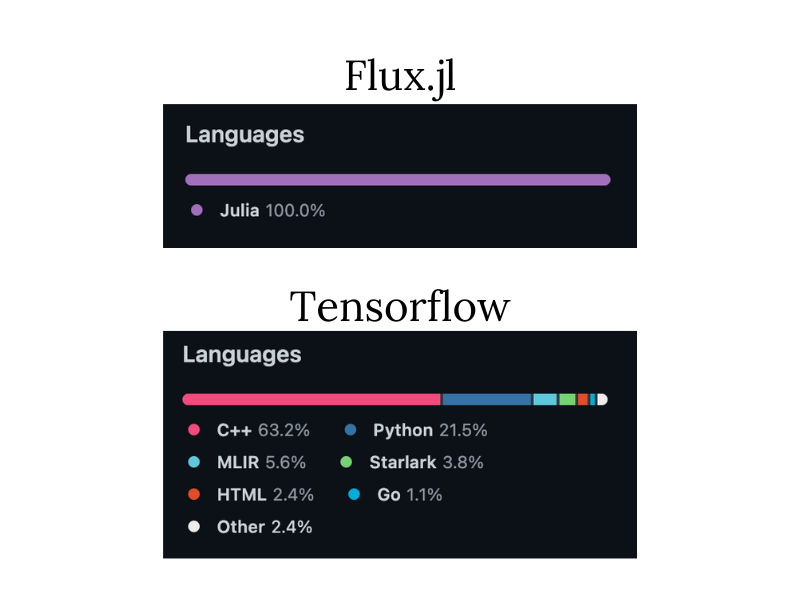
This reliance on other languages is because, in order to develop packages that are efficient and effective at their tasks, they must be built in low-level languages like C and C++.
These packages use such languages because, in scientific computing, developing solutions and packages usually involves two programming languages: the easy-to-use prototype language (like Python) to build a fast initial implementation of the solution and then the fast language (like C++) where all code is rewritten into for the final version of the solution.
As you can imagine, this is a slow, inefficient process not just for the initial development but also for long-term maintenance and new features.
On the other hand, packages in Julia can be prototyped, developed, and maintained in Julia. As a result, this cuts down the entire development cycle to just a fraction of the time.
Julia Machine Learning Packages
Julia now contains over 7,400 packages in its general registry. While this is far from the sheer volume of packages available in Python (over 200,000), finding the right package to solve a specific problem can still be challenging.
This section will explore the main packages you will need to analyze data and build machine learning models.
However, if you're just starting out with machine learning in Julia, try the package toolbox first: MLJ. This package was specifically built to gather the most popular machine learning packages into a single, easily accessible place, saving you time trying to find the best machine learning package for your project. MLJ currently supports over 20 different machine learning packages.
Below is a list of some of the most common packages you will encounter in machine learning projects - from importing, cleaning, and visualizing data, to building models:
- Notebook: Pluto, IJulia, Jupyter
- Package/environment management: Pkg
- Importing and handling data: CSV, DataFrames
- Plotting and output: Plots, StatsPlots, LaTeXStrings, Measures, Makie
- Statistics and Math: Random, Statistics, LinearAlgebra, StatsBase, Distributions, HypothesisTests, KernelDensity, Lasso, Combinatorics, SpecialFunctions, Roots
- Individual machine learning packages:
- Generalized linear models (e.g. linear regression, logistic regression): GLM
- Deep Learning: Flux, Knet
- Support vector machines: LIBSVM
- Decision tree, random forest, AdaBoost: DecisionTree
- K-nearest neighbors: NearestNeighbors
- K-means clustering: Clustering
- Principal component analysis: MultivariateStats
There are also many implementations and wrappers that are available for popular Python packages such as Scikit-Learn and Tensorflow. However, you don’t necessarily need to use these packages, as you may lose out on many of the powerful advantages of using Julia (such as speed and multiple dispatch).
Getting Started with Julia for Machine Learning
One of the best ways to get started with Julia is with the Pluto notebook environment. In this section, we discuss the benefits of using Pluto, especially at the beginning of your data science journey when you're still learning how to build machine learning projects with Julia. We also go over some of the best resources to use to learn more about Julia and machine learning.
Pluto

Pluto is a simple-to-use interactive Notebook environment with a friendly UI. This simplicity makes it very well suited to beginners starting with Julia. Pluto also has many additional features that allow you to build even more compelling machine learning solutions almost effortlessly:
Reactive
When evaluating one cell, Pluto will also consider which other cells must be run. This feature ensures any dependent cells are updated before the current cell is evaluated.
A great thing about Pluto is that it is smart enough to know exactly which cells are required to run in addition to the current cell so that you don't run into the problem of needing to update every cell if you make a change somewhere in your notebook.

Pluto also cleans up old or deleted code and updates the output of any dependent cells to reflect this action. If you define a variable in one cell and later delete that cell, Pluto will also delete that variable from its namespace. In addition, any dependent code cells will show an error message to show that the variable it needed has now been deleted.
Want to Earn daily 500 to 800 USD
by selling High demand &
Ultra modern and novel Gadgets online ?
Interactive
Reactivity causes automatic interactivity between cells. This is especially useful for quickly creating interactive charts or objects that are automatically updated when a variable changes.
The beautiful thing about Pluto is that that variable can be an interactive widget in the notebook, such as a built-in slider or text box. You can even design your own widgets if you know Javascript.
Reactivity and interactivity allow you to produce dynamic reports and dashboards based on your machine learning models and data analyses. The key to a successful machine learning project is communication and Pluto makes it much easier to demonstrate and explain your project.
Automatic Package Management
Pluto integrates seamlessly with Pkg to allow automatic package management in your notebooks. Not only that, but you don't actually need to install packages outside of Pluto. All the information Pluto (and Julia) needs to run and reproduce your notebook is stored right inside the notebook itself!
This means that you can share your notebook with colleagues or classmates, and you can be sure that all the right packages that that notebook needs to run will go with it.
Version Control
All Pluto notebooks are stored as executable .jl files. If you open up a notebook in a text editor, it will look a little different from the notebook you see in your browser. The file will contain all the information needed by the notebook, such as the code, the cell dependencies, and the order of execution. However, these files do not contain any output. All of this makes version control using Git and GitHub much easier.
Exporting & Sharing
Pluto notebooks can be exported as a .jl executable file, a static PDF, or a static HTML file. If you export as HTML, then the person you share it with will also get the option to download and edit the raw notebook file without having Julia installed on their machine.
Pluto achieves this by partnering with Binder - a free platform that hosts Pluto notebooks online (it also works with other programming languages, like Python and R).
This feature is the last step in a machine learning workflow: first you conduct your analyses, then you build an interactive report in your notebook to demonstrate the results, and lastly you are able to share the notebook with technical colleagues, who are able to reproduce and edit the analysis, as well as with those that are non-technical.
Resources for Learning Julia
These are some of the most highly recommended resources for learning about the Julia programming language and how to use it in data science and machine learning:
- If you enjoy learning in an interactive environment, we have an Introduction to Julia course
- For a comprehensive explanation of the Julia programming language, the book Think Julia: How to Think Like a Computer Scientist is one of the best resources.
- Check out our beginner Julia tutorial for a step-by-step guide to getting started with Julia
- See our cheat sheet for a handy guide to the essentials of Julia programming.
https://itexamtools.com/what-is-the-difference-between-python-and-ruby/ |
https://itexamtools.com/7-skills-employers-of-the-future-will-be-looking-for/ |
https://itexamtools.com/aws-masterclass-go-serverless-with-aws-lambda-aws-aurora/ |
https://itexamtools.com/azure-fundamentals-how-to-pass-the-az-900-exam/ |
https://itexamtools.com/what-is-a-business-intelligence-dashboard/  Want to Earn daily 500 to 800 USD by selling High demand & Ultra modern and novel Gadgets online ? |
TOPICS





