Configure Static IP address to Cisco Layer 2 Switch or VLAN interface

July 25, 2023

Configure Static IP address to Cisco Layer 2 Switch or VLAN interface

Configure / Assign Static IP address to Cisco Layer 2 Switch or VLAN interface


Configuring a static IP address on a Cisco Layer 2 switch or VLAN interface is a straightforward process. 

In this example, we'll assume you want to assign a static IP address to a VLAN interface on the switch. 

We'll use the command-line interface (CLI) to demonstrate the configuration. Make sure you have console or SSH access to the Cisco switch.

Step 1: 

Access the CLI
Connect to the Cisco switch using a console cable or SSH client (such as PuTTY). Log in with appropriate credentials to access privileged EXEC mode (enable mode).

Step 2: 

Enter Global Configuration Mode
In the privileged EXEC mode, enter global configuration mode with the following command:

bash

enable
configure terminal

cisco ccna free lab guide


Step 3: 

Create the VLAN (if required)
If the VLAN interface you want to assign a static IP address to does not exist, create it using the following command. Replace VLAN_ID with the desired VLAN number.


vlan VLAN_ID
Step 4: 

Assign the IP Address to the VLAN Interface
Now, you can assign the static IP address to the VLAN interface using the following command. 

Replace INTERFACE_NAME with the name of the VLAN interface (e.g., Vlan10), and IP_ADDRESS with the desired IP address along with the subnet mask (e.g., 192.168.1.1 255.255.255.0).

kotlin
interface INTERFACE_NAME
ip address IP_ADDRESS

Step 5: 
Enable the VLAN Interface
Enable the VLAN interface using the following command:

kotlin

interface INTERFACE_NAME
no shutdown

Step 6: 
Save the Configuration
Once you have assigned the static IP address to the VLAN interface, it is essential to save the configuration to ensure it persists after a reboot. Use the following command to save the configuration:

Want to Earn daily 500 to 800 USD

 by selling High demand &

 Ultra modern and novel Gadgets online ?

START HERE 


arduino
write memory
Your Cisco Layer 2 switch or VLAN interface now has a static IP address assigned to it. 

You can verify the configuration using the show ip interface brief command, which will display the interface along with its IP address and status.

Please note that the specific commands and syntax may vary slightly depending on the Cisco switch model and software version. Always refer to Cisco's official documentation for your particular device to ensure accurate configuration.

Assign ip address to switch or assign ip address to vlan

We will demonstrate on how to assign an ip address statically to cisco layer 2 switch.
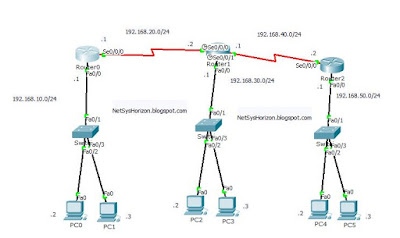
You can assign ip address to a cisco layer 2 switch by using the virtual interfaces  (VLAN interfaces) not physical interfaces, by configuring ip address to the vlan interface as shown in following commands.
cisco ccna free lab guide


London(config)#int vlan 1
London(config-if)#ip address 192.168.10.10 255.255.255.0
London(config-if)#no shutdown
Configure / Assign Static IP address to Cisco Layer 2 Switch or VLAN interface

Looking at the above diagram, we assigned ip address 192.168.10.10 to the cisco switch0, after that Router0 that has ip address 192.168.10.1 can ping to the cisco switch.


Router0#ping 192.168.10.10

!!!!! 


Note that vlans are identified with a number from 1 to 4094 when the enhanced software image is installed and 1 to 1005 when the standard software image is installed.

-------------------------------------------------------------------------------------------------


Data Engineering with Python and AWS Lambda

July 24, 2023

Data Engineering with Python and AWS Lambda


Data Engineering with Python and AWS Lambda LiveLessons (Video Training)

Online Video

Register your product to gain access to bonus material or receive a coupon.

  • Copyright 2020
  • Pages: 384
  • Edition: 1st
  • Online Video
  • ISBN-10: 0-13-596429-6
  • ISBN-13: 978-0-13-596429-3

7 Hours of Video Instruction

Data Engineering with Python and AWS Lambda LiveLessons shows users how to build complete and powerful data engineering pipelines in the same language that Data Scientists use to build Machine Learning models.

 By embracing serverless data engineering in Python, you can build highly scalable distributed systems on the back of the AWS backplane. 

Users learn to think in the new paradigm of serverless, which means to embrace events and event-driven programs that replace expensive and complicated servers.

Description
Some of the many benefits of programming with AWS Lambda in Python include no servers to manage, continuous scaling, and subsecond metering. 

Several use cases include data processing, stream processing, IoT backends, mobile, and web applications.

 Learn to take advantage of a new paradigm in software architecture that will make your code easier to write, maintain, and deploy.

Want to Earn daily 500 to 800 USD

 by selling High demand &

 Ultra modern and novel Gadgets online ?
START HERE 


AWS Lambda functions are the building blocks for creating sophisticated applications and services on AWS. 

In this LiveLesson, you learn to use Python to develop Lambda functions that communicate with key AWS services: API Gateway, SQS, and CloudWatch functions.

 You also learn how a new cloud-based development environment, Cloud9, can streamline writing, debugging, and deploying AWS Lambda functions.
What You Will Learn

  • Performing Data Engineering tasks on AWS
  • Developing with Cloud9
  • Writing AWS Lambda functions in Python
  • Implementing cloud-native Data Engineering patterns, i.e. serverless
  • Architecting event-driven architectures on the AWS platform using SQS, Python Lambda, and other AWS technologies

Who Should Take This Course
  • You are an aspiring data engineer using Python
  • You work with data and want to learn cloud-native data engineering patterns
  • You are new to the AWS Cloud and want to write functions in Python that do not require servers
  • You are a data scientist who needs a simpler way to get data engineering results
  • You want to learn about serverless technology and how to accomplish it in Python

Course Requirements
  • Can write functions in Python and execute statements
  • Have a basic understanding of AWS

Want to Earn daily 500 to 800 USD

 by selling High demand &

 Ultra modern and novel Gadgets online ?

START HERE 


About Pearson Video Training

Pearson publishes expert-led video tutorials covering a wide selection of technology topics designed to teach you the skills you need to succeed. 
These professional and personal technology videos feature world-leading author instructors published by your trusted technology brands: Addison-Wesley, Cisco Press, Pearson IT Certification, Prentice Hall, Sams, and Que. 
Topics include IT Certification, Network Security, Cisco Technology, Programming, Web Development, Mobile Development, 
and more.  Learn more about Pearson Video training at  http://www.informit.com/video.

Video Lessons are available for download for offline viewing within the streaming format. 
Look for the green arrow in each lesson.


Learn More...


Want to Earn daily 500 to 800 USD

 by selling High demand &

 Ultra modern and novel Gadgets online ?

START HERE 


Storage Design and Implementation in vSphere 6

July 23, 2023

Storage Design and Implementation in vSphere 6

Storage Design and Implementation in vSphere 6


Register your product to gain access to bonus material or receive a coupon.

Storage Design and Implementation in vSphere 6: A Technology Deep Dive, 2nd Edition

eBook (Watermarked)

  • Copyright 2018
  • Dimensions: 7" x 9-1/8"
  • Pages: 1280
  • Edition: 2nd
  • eBook (Watermarked)
  • ISBN-10: 0-13-426926-8
  • ISBN-13: 978-0-13-426926-9

Now fully updated: The authoritative, comprehensive guide to vSphere 6 storage implementation and management


Effective VMware virtualization storage planning and management has become crucial—but it can be extremely complex. 

Now, VMware’s leading storage expert thoroughly demystifies the “black box” of vSphere 6 storage and provides illustrated, step-by-step procedures for performing every key task associated with it. 

Mostafa Khalil presents techniques based on years of personal experience helping customers troubleshoot storage in their vSphere production environments.

 Drawing on more experience than anyone else in the field, he combines expert guidelines, insights for better architectural design, best practices for planning and management, common configuration details, and deep dives into both vSphere and third-party storage. 

Storage Design and Implementation in vSphere 6, Second Edition will give you the deep understanding you need to make better upfront storage decisions, quickly solve problems if they arise, and keep them from occurring in the first place.


Coverage includes:

  • Planning and implementing Fibre Channel, FCoE, and iSCSI storage in vSphere virtualized environments
  • Implementing vSphere Pluggable Storage Architecture native multipathing, SATP, PSP, plug-ins, rules, registration, and more
  • Working with Active/Passive and Pseudo-Active/Active ALUA SCSI-3 storage arrays
  • Maximizing availability with multipathing and failover
  • Improving efficiency and value by unifying and centrally managing heterogeneous storage configurations
  • Understanding Storage Virtualization Devices (SVDs) and designing storage to take advantage of them
  • Implementing VMware Virtual Machine File System (VMFS) to maximize performance and resource utilization
  • Working with virtual disks and raw device mappings (RDMs)
  • Managing snapshots in VMFS and Virtual Volumes environments
  • Implementing and administering NFS, VAAI, Storage vMotion, VisorFS, and VASA
  • Integrating VSAN core and advanced features
  • Using Virtual Volumes to streamline storage operations and gain finer VM-level control over external storage


Want to Earn daily 500 to 800 USD

 by selling High demand &

 Ultra modern and novel Gadgets online ?

START HERE 


ads 728x90 B
Powered by Blogger.
